FAB Balance Check – Salary & Prepaid Cards Enquiry
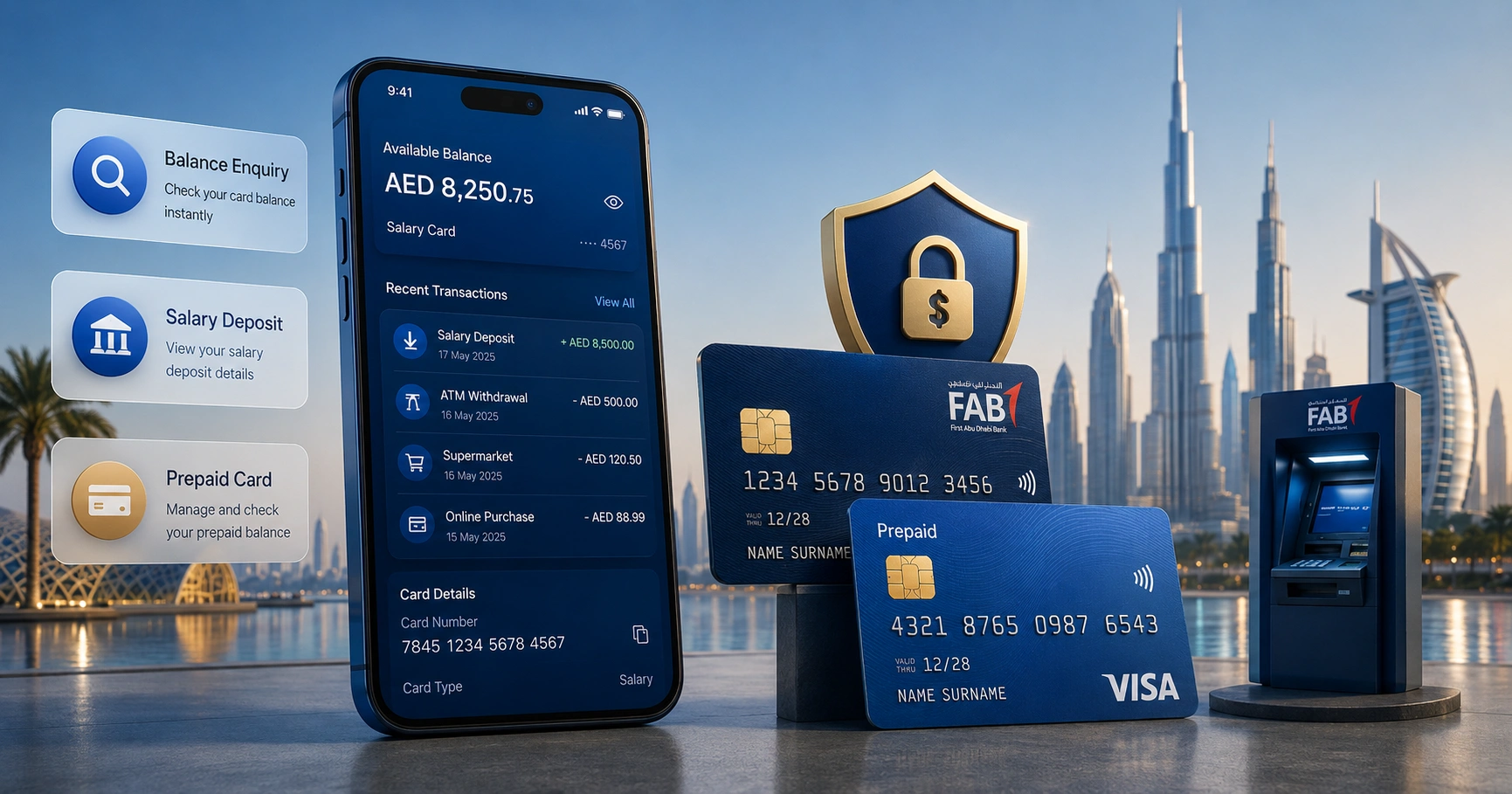
A FAB balance check helps you see how much money is available in your FAB account, Ratibi card, salary card, or prepaid card. In the UAE, this is especially useful for employees who receive a salary through FAB, Ratibi, or WPS payroll cards.
First Abu Dhabi Bank offers several balance enquiry options, including the FAB Mobile app, online banking, ATMs, customer care, SMS alerts, and the prepaid card enquiry portal. The best method depends on the type of FAB product you use.
FAB Balance Check Methods in UAE
FAB gives customers several ways to check their balance. Some methods work best for full bank accounts, while others are designed for salary card and prepaid card users.
| Method | Works For | Internet Needed | Main Benefit |
|---|---|---|---|
| FAB Mobile app | Bank accounts, cards | Yes | Fast and detailed |
| FAB online banking | Bank accounts | Yes | Full account management |
| Prepaid card enquiry portal | Ratibi and prepaid cards | Yes | No account login needed |
| FAB ATM | Debit, prepaid, salary cards | No | Useful offline |
| SMS alerts | Registered accounts and cards | No | Automatic updates |
| Customer care | Most FAB products | No | Support for issues |
| Branch visit | All eligible customers | No | In-person help |
FAB Balance Check Online Through Prepaid Card Enquiry Portal
FAB prepaid card enquiry is one of the most searched balance check methods in the UAE. It is commonly used by Ratibi cardholders, salary card users, and prepaid card customers who may not have a full FAB bank account.
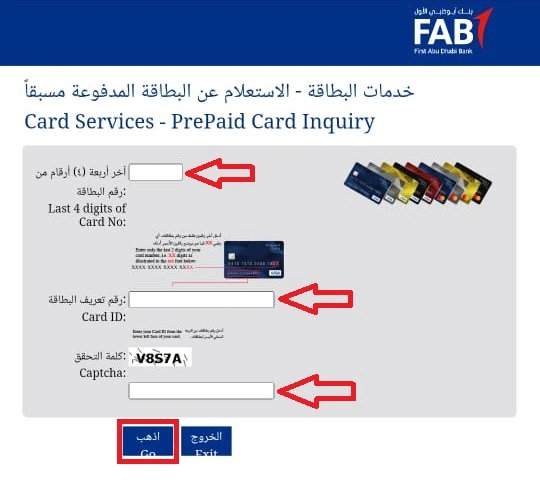
This method is useful because it does not require mobile banking registration. You only need the card details printed on your card and a working internet browser.
Step-by-Step FAB Balance Check Online
Follow these steps to check your FAB prepaid card or Ratibi card balance online:
- Open the FAB prepaid card enquiry page in your browser.
- Enter the last 4 digits of your card number.
- Type your full Card ID exactly as printed.
- Complete the captcha shown on the screen.
- Click the submit or go button.
- View your available balance and recent card details.
This method is best for users who only have a FAB prepaid card, Ratibi salary card, or payroll card. It is also helpful for employees who want to confirm whether their salary has been credited.
Where to Find Your FAB Card ID
Your FAB Card ID is usually printed on the physical card or on the document you received with the card. It is different from your PIN, OTP, or full card number.
Do not confuse the Card ID with your Emirates ID number or mobile number. If the enquiry page keeps showing an error, check the digits again and make sure you are not entering spaces, symbols, or an incomplete number.
FAB Ratibi Card Balance Check for Salary Users
FAB Ratibi card balance check is mainly used by employees in the UAE who receive salary through a prepaid salary card. Ratibi cards are commonly used for workers who do not have a full bank account but still need safe salary access.
Employers can use Ratibi cards to pay eligible employees through the UAE Wage Protection System. Once salary is credited, the cardholder can withdraw cash, make payments, and check the available balance.
Who Uses FAB Ratibi Card?
FAB Ratibi is designed for salary payments, especially for employees who may not qualify for or need a regular bank account. It is widely used in the UAE by companies that pay workers through WPS.
Common Ratibi users include:
- Employees receiving salary through WPS
- Workers without a regular bank account
- Company staff paid through prepaid salary cards
- UAE residents who need easy salary access
- Employers managing payroll for multiple workers
How to Check FAB Ratibi Card Balance
You can check your FAB Ratibi balance using the prepaid card enquiry portal, FAB ATM, or supported customer service channels.
The online method is usually the simplest:
- Keep your Ratibi card with you.
- Enter the last 4 digits of the card.
- Enter the Card ID.
- Complete the captcha.
- Submit the request.
- Check your available salary balance.
This is useful after payday because you can confirm whether your salary has reached your card before visiting an ATM or making a purchase.
Why Your Ratibi Salary May Not Show Immediately
Sometimes your Ratibi balance may not update at the exact moment your employer processes salary. This can happen because of payroll timing, WPS processing, public holidays, bank cut-off times, or employer-side delays.
If your salary is not visible, wait for a reasonable processing window and check again. If the balance still does not update, contact your company HR or payroll department before assuming there is a banking issue.
FAB Salary Card Balance Check
FAB salary card balance check is similar to Ratibi balance enquiry when the salary is paid to a prepaid or payroll card. Many UAE employees use this method to confirm monthly salary deposits.
A salary card is useful because it gives workers access to wages without requiring a traditional bank account. Users can withdraw cash from ATMs, make payments where accepted, and monitor their balance through available FAB channels.
Best Ways to Check FAB Salary Card Balance
| Method | Best Use |
|---|---|
| Prepaid card enquiry portal | Fast online salary card balance check |
| FAB ATM | Cash withdrawal and balance enquiry |
| SMS alerts | Salary credit notifications |
| Customer care | Help with blocked, expired, or inactive cards |
| Employer HR | Salary not credited or payroll delay |
If your balance is lower than expected, review recent withdrawals, card purchases, or service charges. If you believe the salary amount is wrong, speak to your employer first because salary amounts are usually controlled by payroll submission.
FAB Prepaid Card Balance Check
FAB prepaid card balance check is for users who have a prepaid card rather than a full bank account. These cards may be used for salary payments, controlled spending, company disbursements, or other prepaid services.
The easiest way to check a FAB prepaid card balance is through the prepaid card enquiry portal. You can also use an ATM if your card supports ATM access.
What You Can Usually See
Depending on the card type, the balance enquiry may show:
- Available card balance
- Recent transactions
- Card status
- Salary credit or reload activity
- Basic card information
Some prepaid cards may show limited details compared with full bank accounts. For a complete dispute or card issue, customer care may be required.
FAB Balance Check Through FAB Mobile App
The FAB Mobile app is the best option for regular FAB customers who want a fast and detailed balance view. It lets you check account balances, view recent transactions, manage cards, pay bills, and access other banking services from your phone.
This method works best for customers with registered FAB bank accounts. It may not be the right method for every Ratibi or prepaid card user unless the card is linked to mobile banking access.
How to Check FAB Balance in the Mobile App
- Download and open the FAB Mobile app.
- Register or log in using your FAB credentials.
- Complete OTP verification if required.
- Go to the account or card dashboard.
- View your available balance.
- Tap the account to see recent transactions.
The app is useful for daily money management because it gives more than a simple balance. You can also monitor payments, card activity, transfers, and account statements.
When to Use the FAB Mobile App
Use the FAB Mobile app if you:
- Have a FAB current or savings account
- Want detailed transaction history
- Need to manage multiple accounts or cards
- Prefer biometric or PIN login
- Want to transfer money or pay bills
- Need quick access to account services
If you only have a Ratibi or prepaid salary card, the prepaid card enquiry portal may be easier.
FAB Online Banking Balance Check
FAB online banking is useful for customers who prefer checking their account from a laptop or desktop. It gives a wider view of accounts, cards, statements, transfers, and payment services.
This method is best for regular FAB bank account holders. It is also useful when you need to download statements or review detailed transaction history.
How to Check FAB Balance Through Online Banking
- Open FAB online banking.
- Enter your customer ID or registered login details.
- Complete OTP or security verification.
- Choose the account you want to view.
- Check your available and current balance.
- Open transactions if you need more details.
Online banking is helpful for users who manage salary accounts, savings accounts, business payments, or multiple cards. It is not always the fastest option for prepaid salary card users.
FAB Balance Check at ATM
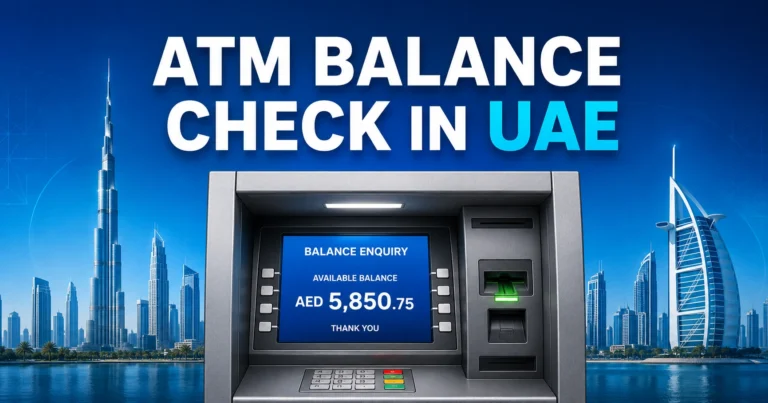
FAB ATM balance enquiry is a reliable option when you do not have internet access. It works for many FAB debit cards, salary cards, and prepaid cards that support ATM transactions.
You can use this method to check your balance before withdrawing cash. Some ATMs also allow mini statements, depending on card type and machine availability.
How to Check FAB Balance at ATM
- Visit a FAB ATM or compatible ATM.
- Insert your FAB card.
- Enter your PIN securely.
- Select balance inquiry.
- View your balance on the screen.
- Print a receipt if required.
Always cover the keypad while entering your PIN. Avoid accepting help from strangers at ATMs, especially if your card is stuck or the machine shows an error.
FAB Balance Check by SMS Alerts
SMS alerts help you stay updated when money enters or leaves your FAB account or card. This is not always the same as manually requesting a balance, but it is useful for salary credits, withdrawals, payments, and suspicious activity.
To receive SMS alerts, your mobile number must be registered with FAB. If your number has changed, update it through the proper banking channel so you do not miss important notifications.
When SMS Alerts Are Useful
SMS alerts are helpful for:
- Salary credit confirmation
- ATM withdrawal notifications
- Card purchase updates
- Transfer alerts
- Fraud monitoring
- Low-balance awareness
Some SMS services may depend on account type, card type, mobile registration, and banking setup. Standard telecom charges may apply in some cases.
FAB Balance Check Through Customer Care
FAB customer care is useful when the app, ATM, or prepaid portal does not solve your issue. It can help with blocked cards, failed login attempts, missing salary, wrong card details, suspicious transactions, and account access problems.
For UAE support, FAB customers commonly use the official UAE customer service number. International customers can use the overseas support line when calling from outside the UAE.
What You May Need for Verification
Before discussing account or card details, customer care may verify your identity. Keep the following ready:
- FAB account number or card details
- Registered mobile number
- Emirates ID details if required
- Security answers
- Recent transaction information
Never share your OTP, card PIN, online banking password, or full card security details with anyone. A genuine support process should not require your secret PIN.
FAB Balance Check Through Branch Visit
A branch visit is not the fastest way to check FAB balance, but it is useful for complex issues. Visit a branch if your card is blocked, your salary card is not working, your mobile number is outdated, or you cannot access digital services.
Carry your Emirates ID and any card or account document linked to the issue. For salary card concerns, it may also help to speak with your employer first if the issue is related to payroll.
Difference Between FAB Account Balance and FAB Card Balance
Many users search for FAB balance check without knowing whether they need account balance or card balance. These are not always the same thing.
A FAB account balance belongs to a bank account such as current, savings, salary, or iSave account. A FAB card balance may refer to a prepaid card, Ratibi card, payroll card, or payment card.
| Balance Type | Used By | Best Method |
|---|---|---|
| FAB account balance | Bank account holders | Mobile app or online banking |
| FAB salary account balance | Employees with full FAB account | App, online banking, ATM |
| FAB Ratibi balance | WPS salary card users | Prepaid card enquiry portal |
| FAB prepaid card balance | Prepaid cardholders | PPC enquiry portal or ATM |
| FAB credit card balance | Credit card users | App, online banking, statement |
Understanding this difference helps you choose the right method and avoid login errors.
Common FAB Balance Check Problems and Fixes
FAB balance check is usually simple, but users may face errors due to wrong card details, app issues, delayed salary, or system maintenance. Most problems can be solved by checking the method you are using and confirming your details.
Wrong Card ID Error
A wrong Card ID error usually happens when users enter the card number instead of the Card ID. It can also happen if spaces, symbols, or missing digits are entered.
Check your card carefully and type the Card ID exactly as printed. If the issue continues, contact FAB support or ask your employer for the correct salary card details.
Captcha Not Working
Captcha errors happen when the code is entered incorrectly or the page expires. Refresh the page and enter the new captcha carefully.
If the captcha image does not load, try another browser, clear cache, switch internet connection, or use a different device. Avoid repeated failed attempts because the page may temporarily block submissions.
FAB App Not Showing Balance
If the FAB Mobile app does not show your balance, the app may be outdated, your internet may be unstable, or the bank may be performing maintenance.
Update the app, restart your phone, and try again. If the issue continues, use online banking, ATM balance enquiry, or customer care.
Salary Not Credited to Ratibi Card
If your Ratibi salary is not showing, first check whether your employer has processed payroll. Salary delays can happen due to WPS timing, public holidays, bank processing, or employer submission delays.
Check again later and speak with your HR or payroll team. If your employer confirms salary has been sent, contact FAB support with your card details.
ATM Does Not Show Balance
An ATM may fail to show balance if the machine is offline, under maintenance, or unable to read your card. Try another FAB ATM before assuming there is a card issue.
If multiple machines reject your card, the card may be blocked, expired, damaged, or inactive. In that case, contact customer support.
Card Blocked or Expired
If your FAB salary card, Ratibi card, or prepaid card is blocked or expired, the online portal or ATM may not show balance correctly.
Check the expiry date on the card. If it is expired, contact your employer or FAB support depending on how the card was issued.
Safety Tips for FAB Balance Check Online
FAB balance check should only be done through trusted banking channels. Fake balance check pages can collect card details, mobile numbers, OTPs, or passwords.
Use these safety tips before checking your balance:
- Do not enter your PIN on random websites.
- Do not share OTPs with anyone.
- Check the website address before entering card details.
- Avoid public Wi-Fi for banking.
- Do not save card details on shared phones.
- Log out after using online banking.
- Keep your registered mobile number updated.
- Report suspicious SMS or calls immediately.
A balance enquiry should not ask for your ATM PIN, full online banking password, or OTP unless you are logging in through a secure official banking channel.
Best FAB Balance Check Method by Situation
Different users need different balance check methods. A Ratibi cardholder does not need the same method as a full FAB account holder.
| Situation | Recommended Method |
|---|---|
| You have a FAB bank account | FAB Mobile app |
| You use a desktop or laptop | FAB online banking |
| You have a Ratibi card | Prepaid card enquiry portal |
| You have a prepaid salary card | PPC balance enquiry portal |
| You have no internet | FAB ATM |
| You want salary credit alerts | SMS notifications |
| Your card is blocked | Customer care |
| Your salary is missing | Employer HR, then FAB support |
| You need detailed statements | Online banking or mobile app |
FAB Balance Check for UAE Employees
For UAE employees, FAB balance check is often connected to salary tracking. Many workers want to know whether their salary has been credited before withdrawing cash or sending money home.
If you receive salary through a normal FAB account, use the FAB Mobile app or online banking. If you receive salary through Ratibi or prepaid card, use the prepaid card enquiry method.
Practical Tips for Salary Users
- Check your balance after your usual salary date.
- Keep your card and Card ID safe.
- Do not share your salary card PIN.
- Ask HR if salary is delayed.
- Use ATM only when you need cash.
- Keep SMS alerts active if available.
- Report missing or wrong salary quickly.
These habits make it easier to track monthly salary and avoid confusion around payroll delays.
FAB Minimum Balance Rules
Some FAB bank accounts may require a minimum balance, depending on account type and product terms. This usually applies to regular savings or current accounts, not every prepaid or salary card.
If your account has a minimum balance requirement, keeping less than the required amount may result in monthly charges. Salary cards and prepaid cards may follow different rules, so always check the product conditions linked to your account or card.
Why Minimum Balance Matters
Knowing your minimum balance helps you:
- Avoid monthly charges
- Manage spending better
- Keep your account active
- Plan salary withdrawals
- Prevent failed payments
For Ratibi and prepaid salary card users, the main concern is usually available salary balance rather than minimum account balance.
FAB Balance Check and Salary Delays
A missing balance does not always mean there is a problem with your card. In many cases, salary delays are connected to payroll processing, employer approval, WPS submission, public holidays, or bank cut-off timings.
If your salary usually arrives on a fixed date but does not appear, check again later. Then contact your HR department to confirm whether the salary file was submitted successfully.
What to Do If Salary Is Missing
- Check your balance using the correct method.
- Review recent transactions.
- Ask coworkers if they received salary.
- Contact your company HR or payroll team.
- Confirm whether the salary was processed through WPS.
- Contact FAB support if payroll was completed but balance is still missing.
This order saves time because many salary card delays start from employer-side processing rather than the card itself.
FAB Balance Check Without Login
FAB balance check without login is mainly available for prepaid card and Ratibi card users through the prepaid card enquiry portal. You only need card details and captcha, not a full online banking username.
For regular FAB bank accounts, login is usually required through the FAB Mobile app or online banking. This protects your account and prevents unauthorized access.
Who Can Use No-Login Balance Check?
No-login balance enquiry is most useful for:
- Ratibi cardholders
- FAB prepaid card users
- Salary card users
- Workers without full online banking access
- Users who only need quick card balance
Do not use unofficial websites claiming to check FAB balance without login. Always protect your card details and avoid pages that ask for PIN or OTP unnecessarily.
FAB Balance Check for Different Customer Types
FAB serves different kinds of customers, so balance check methods are not identical for everyone. The right method depends on whether you use a bank account, prepaid card, salary card, or credit card.
For Ratibi Card Holders
Use the prepaid card enquiry portal with your last 4 card digits and Card ID. This is usually the most direct option for Ratibi salary balance.
For FAB Prepaid Card Holders
Use the prepaid card enquiry page or ATM balance inquiry if your card supports ATM access. Keep the card details secure.
For FAB Bank Account Holders
Use the FAB Mobile app or online banking. These methods show account balance, transactions, statements, transfers, and other banking features.
For Salary Account Holders
If your salary is paid into a full FAB account, use the app, online banking, ATM, or SMS alerts. If it is paid to a salary card, use the prepaid card method.
For Credit Card Users
Use the FAB Mobile app or online banking to check outstanding balance, available credit limit, due amount, and payment status.
How to Choose the Right FAB Balance Check Method
Choose your method based on access, speed, and account type. For most regular banking users, the FAB Mobile app is the most convenient. For salary card users, the prepaid portal is more practical.
| Priority | Best Method |
|---|---|
| Fastest regular account check | FAB Mobile app |
| Best salary card check | Prepaid card enquiry portal |
| Best no-internet option | FAB ATM |
| Best detailed view | Online banking |
| Best for salary notifications | SMS alerts |
| Best for technical problems | Customer care |
The safest approach is to use the method designed for your product type. This avoids wrong login attempts and saves time.
FAQs
How can I check my FAB balance online in UAE?
You can complete a FAB balance check online through the FAB Mobile app, online banking, or the prepaid card enquiry portal. Regular account holders should use the app or internet banking, while Ratibi and prepaid salary card users can use the card enquiry page with Card ID details.
How do I check my FAB Ratibi card balance?
For FAB Ratibi card balance check, use the prepaid card enquiry method. Enter the last 4 digits of your card, your Card ID, and the captcha shown on the page. This helps UAE salary card users confirm salary deposits without needing full online banking access.
Can I do FAB balance check without login?
Yes, FAB balance check without login is usually possible for Ratibi and prepaid card users through the prepaid card enquiry portal. Regular bank account holders normally need secure login through the FAB Mobile app or online banking because account details require stronger identity verification.
Why is my FAB salary not showing in my balance?
Your FAB salary may not show because of employer payroll delay, WPS processing time, public holidays, bank cut-off timing, or card issues. First check your balance again later, then contact your HR department. If payroll is confirmed, contact FAB support for card-related checking.
What details are needed for FAB prepaid card balance check?
For FAB prepaid card balance check, you usually need the last 4 digits of your card, the Card ID, and the captcha displayed on the enquiry page. Do not enter your PIN or OTP on unknown websites, and always make sure you use a secure balance enquiry channel.
Can I check FAB balance at an ATM?
Yes, you can do a FAB balance check at an ATM if your card supports ATM access. Insert your card, enter your PIN, and choose balance inquiry. This method is useful when you do not have internet or cannot access mobile banking.
Is FAB balance check free?
FAB balance check is usually free through the FAB Mobile app, online banking, prepaid card enquiry portal, and FAB ATMs. Some third-party ATMs, SMS services, or telecom networks may apply charges. Always check your account or card terms if you are unsure about fees.
Which FAB balance check method is best for salary card users?
The best FAB balance check method for salary card users is usually the prepaid card enquiry portal because it works without full bank account login. Ratibi and prepaid salary cardholders can use card details to check available salary balance and recent card activity quickly.